Easy patch management on macOS - zero packaging required


Security vulnerabilities get closed as soon as updates are available - not when someone has time to package them. End users get updates that never interrupt their work. Admins get an environment that runs like they want. And countless hours your team spends custom packaging and deploying updates are eliminated.
One lightweight agent, no manual work.
1000+ supported applications and command-line tools, installed and updated automatically from a catalog that refreshes multiple times daily.
Install the lightweight agent and configuration profile through your MDM

Select applications, set update windows, and define how users are notified
Apps install and update automatically, validated and secure, with no packaging required

Simple, lightweight agent written in Swift. Painless software deployment. Make it easy.

Skip the complexity—deploy the latest apps with no servers, no coding, and no packaging needed
.svg)
Integrate with MDMs including Jamf Pro, Jamf Now, Jamf School, Mosyle, Iru (formerly Kandji), Addigy, Microsoft Intune, Omnissa, Meraki SM, ManageEngine, JumpCloud

Build a comprehensive Patch Report via CLI, highlighting installed apps, outdated versions, and detailed update deferral insights including both timestamps and reasons

Effortlessly configure the most customizable Patch Management solution using our powerful desktop app
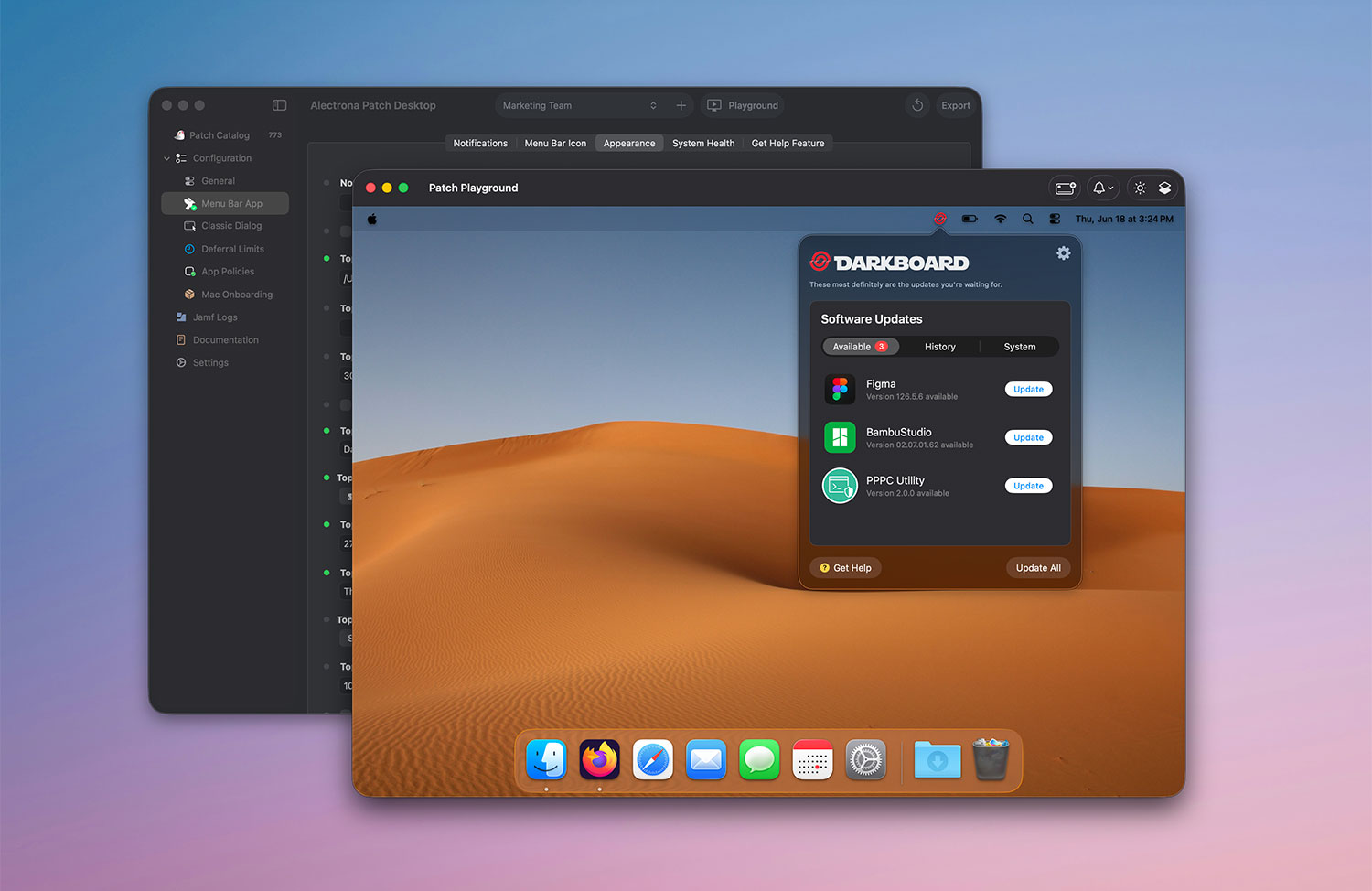
Make it your own - match prompts to your brand and write them in your organization's voice.
100 Macs
Patch management made easy for organizations large & small
Book a Demo
The median time to exploit a new vulnerability is under 5 days. The average enterprise takes 60 to 150 days to remediate. Automated patching eliminates the packaging delays and admin bottlenecks that keep that gap open.

Updates your users won't fight
Admin sets the catalog and update policy once. From there, apps stay current across the fleet. If an app isn't running, the update happens silently. If it is, the user gets a clear prompt with the option to defer. No surprise interruptions, no tickets, no chasing down machines.
Custom branding
Make the update experience yours. Customize notification language, branding, and deferral prompts so updates look and feel like they come from your organization - not an external tool.
Alectrona Patch maintains a continuous record of update status, deferral history, and version compliance across your fleet. When auditors ask how quickly patches are applied and whether you can prove it - the answer is already built.
Validated before it installs
Every update is cryptographically verified against the developer's code signature before installation proceeds. Unsigned or modified binaries are rejected automatically.
Defense built in
Software supply chain attacks target legitimate update channels to deliver malicious payloads. On-the-fly signature validation creates a verification layer between the vendor and the endpoint. If a binary has been tampered with, it doesn't reach the Mac.

Documentation
Everything you need to deploy, configure and manage Alectrona Patch:

App Catalog
Browse the full list of supported applications and command-line tools:

Our most commonly asked questions about getting started with Alectrona Patch. If you have other questions feel free to check out our documentation or book a demo:

The Alectrona Patch catalog is updated several times a day, and new definitions for updated applications are added to the catalog as new versions are made available by the software vendor.
Alectrona Patch is fully cloud-hosted with no on-premise infrastructure required. All updates are downloaded from the software vendor's website or CDN directly from your endpoint Macs.
No. Alectrona Patch supports updating third-party applications that are not installed or managed by the Mac App Store. We recommend leveraging your MDM to manage and enforce software updates with DDM (Declarative Device Management).
No, Alectrona Patch always installs the latest version to ensure you are receiving the latest security updates available. If you wish to install older versions, we recommend hosting this package yourself as many vendors only publish the latest version.
Yes, the Patch CLT (Command Line Tool) has several options to force an update to be completed.
If an application is not open, the application will update automatically. If you are looking to force install, use the --force flag when calling the Patch binary.
Alectrona Patch is for Mac apps only, specifically those outside of the Mac App Store.
By request. Existing Alectrona Patch customers are welcome to reach out to our support team to request any apps not yet available in the catalog. If all requirements are met, we can add the requested app to the catalog in a short period of time.
Yes - contact us about setting up your organization's 14 day trial to check out the Alectrona Patch experience inside your environment.
Contact UsYes, Alectrona Patch can be configured to automatically install a specified list of software via a configuration profile, or alternatively be integrated into onboarding workflows using tools like Setup Your Mac or Jamf Setup Manager.


